
Magic Lens Photo Media · Editing standards
What should AI editing and virtual staging change in a real estate photo? My standard is to improve how the photograph communicates the property while preserving the property's actual features and condition. Light, color and perspective can need correction. Added furniture needs clear identification. A missing defect, invented view or altered room crosses the line.
The finished image must still describe the place.
For an Orlando listing, the question is larger than whether an edit looks convincing. A buyer will eventually walk through the door. I want the photographs to help that person recognize and understand what is there. That is the standard I use to evaluate an editing request, whether the tool involves AI or conventional retouching.
Cover disclosure: The cover contains digitally added bedroom furniture. See the original room and the full concept below.
Start with the effect of the edit
Three decisions before touching the image.
Correct the capture
Make existing details easier to see. Check that color, proportions and the view still correspond to the property.
Identify a concept
If furnishings are digitally added or replaced, make that clear. Keep a version that shows the actual room.
Refuse a false representation. I will not use an edit to hide damage, change permanent features or create a view the property does not have. A disclosure label does not make every alteration acceptable.
The demonstration below pairs a real empty-bedroom photograph with an AI-assisted furnishing concept created for this article. It illustrates virtual staging; it is not a completed client staging assignment or a claim of MLS approval.
01 · Photographic correction
Reveal the room that was photographed.
My correction checklist covers exposure, white balance, consistent color and restrained perspective adjustment. Review the visible finishes and proportions against the source photograph. Brightening a shadow should reveal the existing surface, not conceal its condition.
Ask the photographer to explain any treatment that changes what a buyer might believe about the property. An exposure correction and digitally added furniture serve different purposes and need different descriptions.
The before-and-after editing guide discusses image finishing. The full-room comparison below focuses specifically on the addition of furnishings.
02 · Temporary objects
Prepare the space first. Review removal requests individually.
I prefer moving a loose item before the shoot when possible. Removing a wastebasket or a bag physically gives the camera a clear view of the surface behind it. Digital removal requires reconstructing that surface, so it needs closer review.
An object-removal request needs three answers: what is the item, will it remain and what is behind it? An easily moved personal item and a damaged permanent feature require different decisions. If the underlying surface is unknown, provide a clear reference photograph or arrange a new view.
That distinction matters outside, too. I will not remove neighboring buildings, utility infrastructure or established vegetation to suggest a different setting. If something has actually been repaired or removed, updated photography provides a more useful record than guessing at the result in an editor.
Stellar's photo rules overview distinguishes removable items from alterations such as deleting utility lines, adding landscape plantings or concealing material flaws. Check the applicable rule before approving a particular request.
03 · Virtual staging
Compare the actual room with a furnishing concept.
The source photograph is an empty room from the Magic Lens Winter Haven collection. The concept adds a bed, bedside furniture and a freestanding lamp. Both views show the full frame, so the doors, ceiling and bathroom opening can be compared directly.
Original room photograph
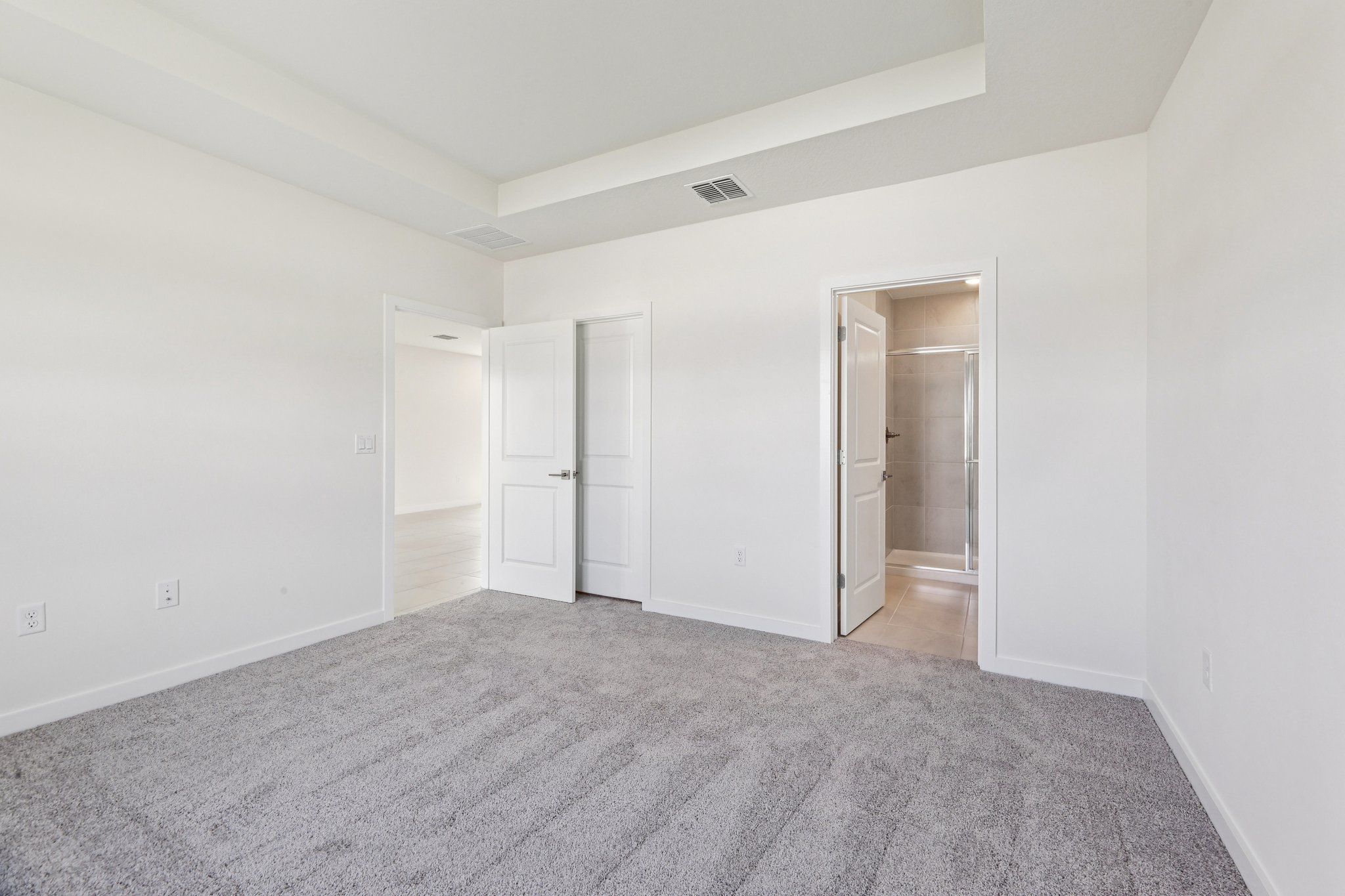
AI-assisted virtual staging concept

My standard is to keep the permanent room features intact and use furniture at a credible scale. Compare every AI-assisted result against the original: attractive furnishings do not excuse changed openings, invented fixtures or altered visible condition. This demonstration does not verify furniture dimensions or establish that this property is eligible for a staged MLS submission.
For an order, specify whether both the original room photograph and the staged version are included in delivery. Agree on the labels and filenames before production so the agent can distinguish the existing space from the proposed arrangement. Original-file delivery is a term to confirm in the quote.
For Stellar MLS submissions: Article 04.04 requires “Virtually staged” in the photo description, the virtually staged field checked, and public remarks beginning “One or more photo(s) was virtually staged.” The rule prohibits virtual staging for pre-construction and under-construction properties and prohibits words on property photographs. Use its specified fields for those disclosures. Read Article 04.04.
Those are Stellar requirements, checked October 3, 2026. They are separate from my editorial preference to show the full original beside a concept on this blog. The listing agent should confirm the applicable MLS, brokerage and publishing requirements before using a staged image.
Magic Lens lists virtual staging among its available media services. Send the room photograph and intended destination when requesting a scope.
04 · Sky and twilight treatment
Keep the atmosphere tied to the property.
A virtual twilight image is a digitally treated photograph. Identify the treatment in the agreed deliverables and confirm whether the daylight reference will be supplied. An invented waterfront outlook, missing adjacent house or added landscape lighting would misrepresent the setting.
Stellar permits twilight treatment only when lighting is not added where it does not exist and the sunrise or sunset reflects the actual direction. Its virtual staging rule also bars changes to permanent fixtures and distortion of room dimensions.
Review edges, reflections and the overall lighting together when considering a sky replacement. If a particular sunset outlook is a selling point, photograph it at the appropriate time so the presentation has a direct reference.
05 · The delivery review
Give the agent an image they can explain.
Before booking, confirm the image count, which final versions will be delivered, whether original room images are included, the disclosure format and the delivery date. Then use this review when the files arrive:
- Describe the request. Identify the exact object or area and the intended change. “Make it look better” is not a useful editing instruction.
- Compare with the original. Check room proportions, permanent features, finishes, surroundings and any visible damage.
- Separate actual and conceptual versions. Check the agreed filenames and delivery notes for digitally furnished or twilight images. Confirm that the quoted original references are present.
- Check the publishing destination. The agent completes required MLS fields and confirms brokerage and platform requirements before using the files.
The 2026 NAR Code of Ethics, Article 12 and Standard of Practice 12-10, requires REALTORS® to present truthful marketing and prohibits misleading images. This is a standard for NAR members; it is distinct from the MLS submission rules above. That professional standard supports a simple review question: could this edit cause someone to misunderstand the property?
Rules checked October 3, 2026. This article explains my photography standards and selected MLS requirements; it is not a complete compliance guide. Confirm the current rule and any uncertain case with the listing broker or the relevant MLS.