
REALTOR AI PLAYBOOK · 10
Better Marketing. Stronger Conversations. Practical AI.
You do not need to deliver a monologue on camera to explain a property. A short sequence of good photographs, concise text and an optional voiceover can give viewers a useful introduction. The work is choosing what each frame should explain.
Start with the materials you already have permission to use. Select one exterior or context image, a wider interior view, two distinct room views and one additional feature. Then write one sentence describing the job of each image. If two images do the same job, choose the clearer one.
This chapter builds a six-frame storyboard from real Magic Lens photographs. You will get on-screen wording, optional narration, an editing checklist and a prompt for adapting the method. It is a proposed production plan, not a finished video or a promise of leads.
Give the photographs a sequence
A folder of attractive images is not automatically a story. A viewer needs enough context to understand what they are looking at and why the next image appears. An exterior establishes the subject. A wider interior view adds spatial context. A room view lets the viewer inspect something more closely.
Sequence does not have to imply a literal walking route. If you have not verified how every room connects, avoid transitions or narration that claim to move through the home in physical order. You can present a curated introduction without pretending it is a continuous walkthrough.
Use photographs accurately. Do not invent dimensions, label an unverified room as a bedroom or assume a visible feature is included in a sale. The images can support an introduction; property claims still need confirmation from the appropriate source.
The material for this demonstration
The example uses photographs from Magic Lens's published Palm Bay model-home case study: an exterior, a view across the kitchen island toward living and dining areas, a kitchen view, a staged bedroom and a covered patio. The final frame is an editorial question card.
The property is presented as an archived photography example. Current price, availability, dimensions and sale terms are not represented. The wording below is a teaching proposal, not an advertisement for a currently available listing.
For your own project, add only verified listing information and the identification required by your approved marketing process. If a fact is missing, leave it out or obtain it before editing. Do not ask AI to infer it from a photograph.
Build your own material brief
Create a six-frame storyboard for a short property introduction
using only the photographs I list below. No talking-head footage.

PURPOSE: help a viewer understand the property at an introductory level.
AUDIENCE: [WHO NEEDS THIS EXPLANATION]
VERIFIED PROPERTY FACTS: [FACTS + SOURCE]
AVAILABLE PERMITTED IMAGES: [FILE + WHAT IT ACTUALLY SHOWS]
MISSING OR UNVERIFIED: [DETAILS TO LEAVE OUT]
NEXT STEP THAT ACTUALLY EXISTS: [ACTION + VERIFIED DESTINATION]

For each frame, return:
- The exact available image to use, or a text-only card.
- One short on-screen sentence.
- Optional narration that supports the same idea.
- The purpose of the frame.
- Any fact requiring confirmation.

Do not invent footage, rooms, measurements or sales claims.
Do not imply a continuous walking route unless it is verified.
Use American English and a calm, clear tone.
Label the plan as a proposed storyboard, not a completed video.
File names matter here. “Beautiful living room” is not enough to tell an editor which asset to use. A clear material list reduces confusion and makes it easier to check that the proposed text fits the image.
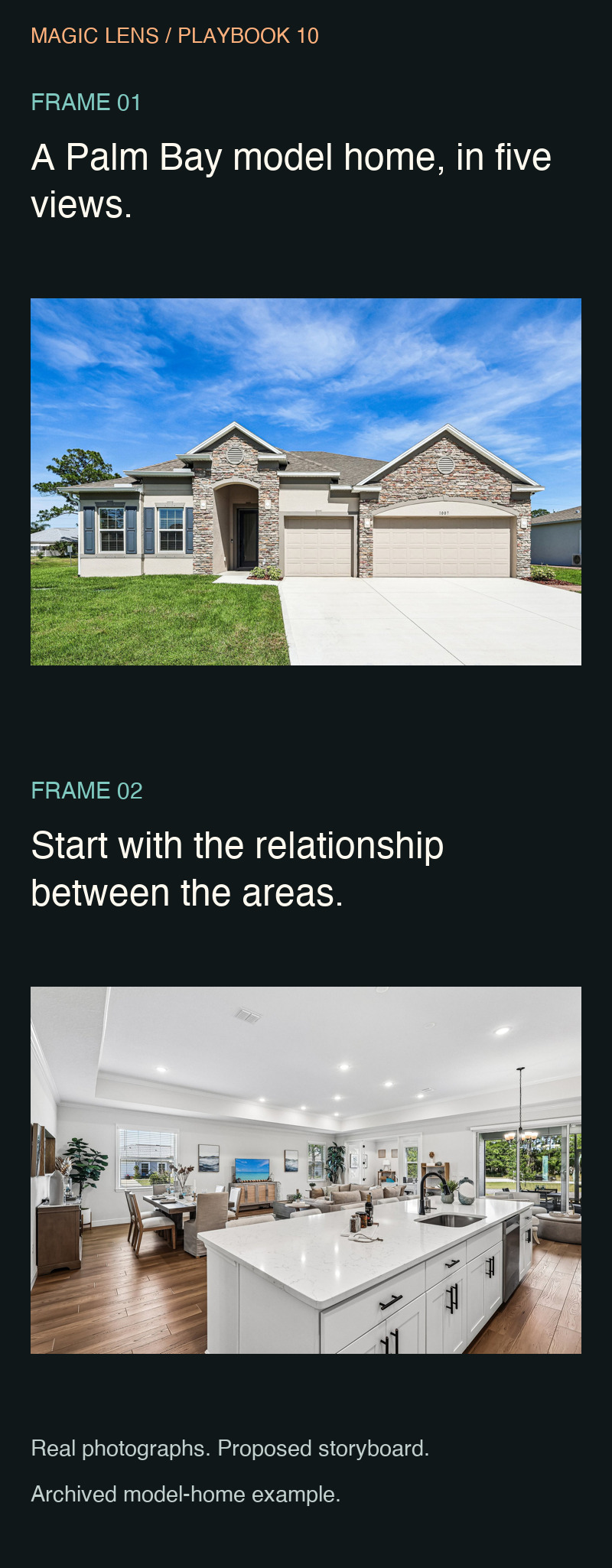
Frames 1 and 2: establish the subject and context
Frame 1 — exterior introduction
Image: the real exterior photograph. On-screen text: “A Palm Bay model home, in five views.” Optional narration: “Here is a short visual introduction to an archived Palm Bay model-home photography project.”
The frame tells the viewer what the sequence is. It does not say “just listed,” “available now” or introduce an unverified price. Hold it long enough for the short text to be read without rushing.
Frame 2 — wider interior context
Image: the photograph across the island toward the living and dining areas. On-screen text: “Start with the relationship between the areas.” Optional narration: “The wider view helps show the kitchen in relation to the living and dining areas.”
This frame adds context before the closer kitchen view. Keep the relevant areas visible. A tight vertical crop that removes them would undermine the purpose of the frame.
Frames 3 and 4: add distinct room views
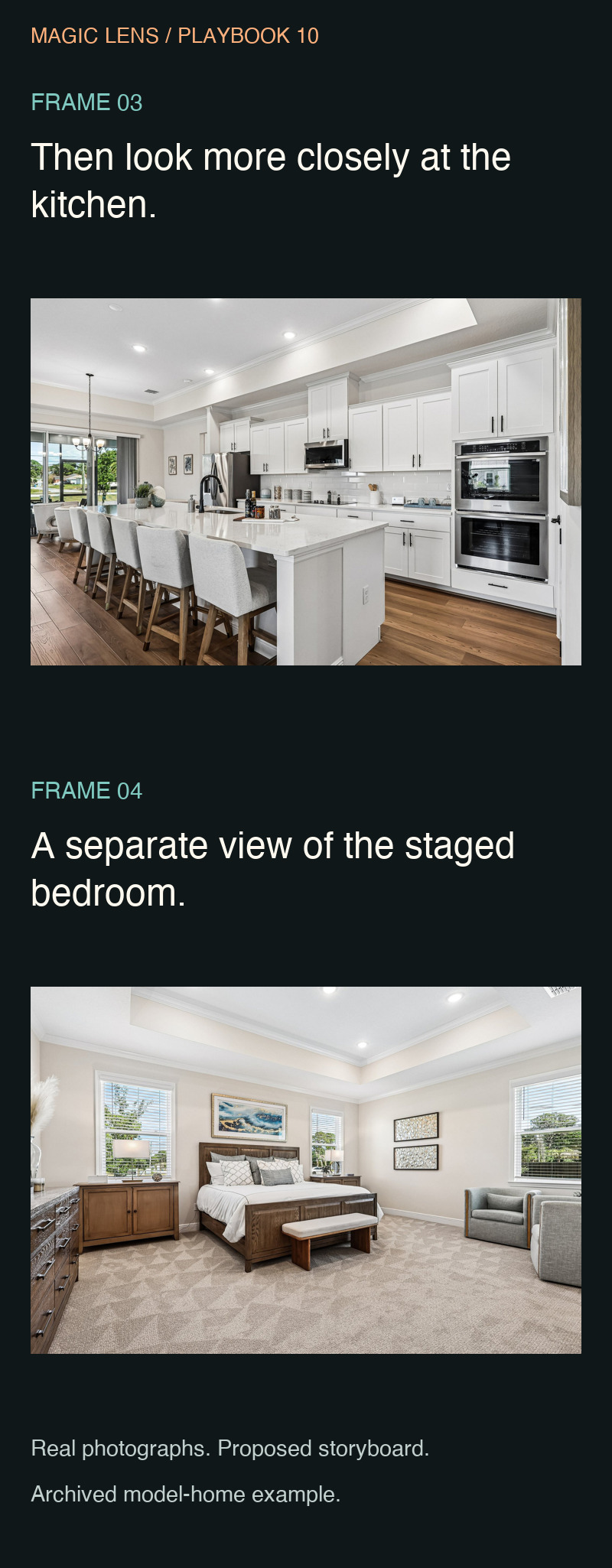
Frame 3 — kitchen view
Image: the kitchen-focused photograph. On-screen text: “Then look more closely at the kitchen.” Optional narration: “This second angle gives the kitchen its own moment after the overview.”
Let the photograph show the visible details without piling adjectives over it. Do not identify material grades, appliance specifications or included items unless those facts are verified separately.
Frame 4 — staged bedroom
Image: the bedroom photograph identified in the source case. On-screen text: “A separate view of the staged bedroom.” Optional narration: “The staged bedroom adds another part of the home's presentation.”
Describe what the image supports. Avoid claims about quietness, exact capacity or how the room will suit a particular person. If furniture fit matters, the next step is to obtain relevant measurements.
Frames 5 and 6: finish the introduction with a useful question
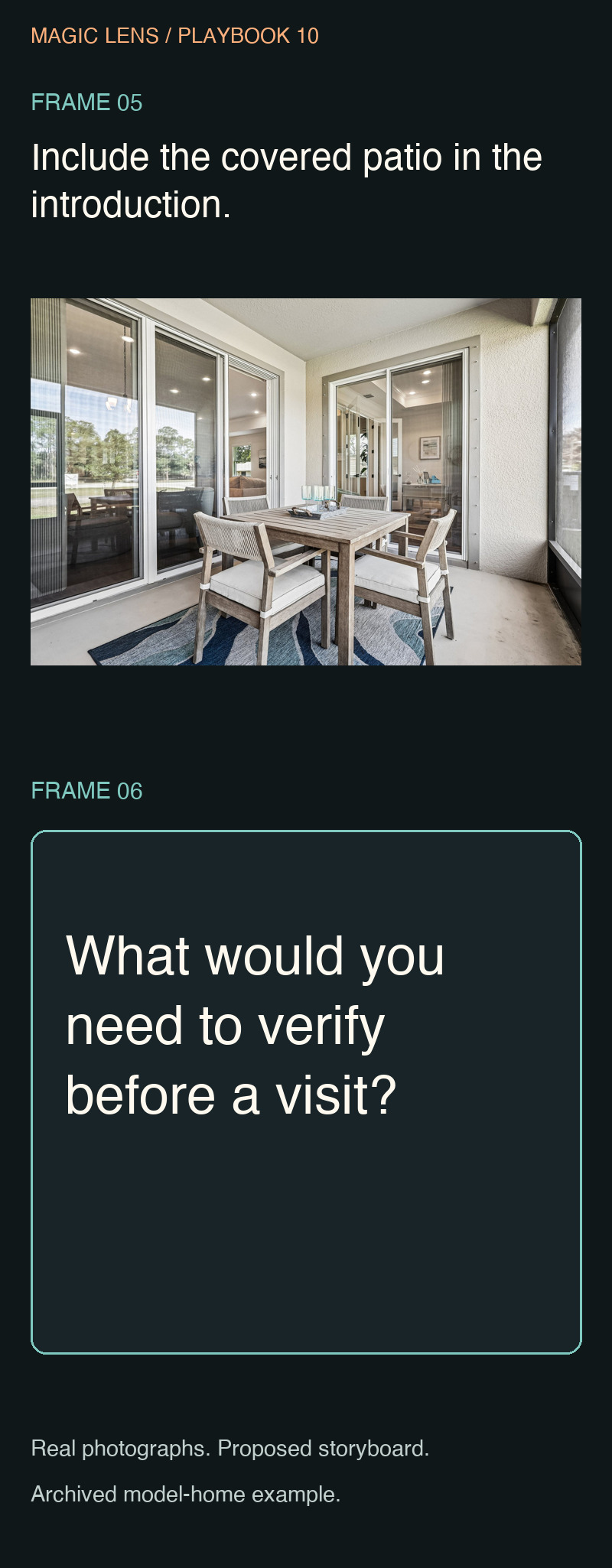
Frame 5 — covered patio
Image: the covered patio photograph. On-screen text: “Include the covered patio in the introduction.” Optional narration: “The patio photograph adds an outdoor living area to the visual overview.”
This changes the type of view without claiming year-round comfort, privacy or a specific usable area. The editorial choice is to show a distinct part of the property, not to turn a photograph into a guarantee.
Frame 6 — next-question card
Visual: a simple text card. On-screen text: “What would you need to verify before a visit?” Optional narration: “Use the photographs to identify your next questions. Confirm current details before planning a visit.”
For a live listing, the card could point to an actual, verified next step. For this archived example, a question is more accurate than an invitation to book a showing. The call to action must match the status of the property.
Set a pace the viewer can follow
Begin with a rough editing allowance of three to five seconds per frame, then adjust by reading the text on a phone. This is a starting point for this exercise, not a platform rule or an optimal duration claim. Some images need more inspection time than others.
Keep transitions simple enough that the viewer can understand the change of subject. A rapid effect can make a sequence feel busy without making the property easier to understand. The test is whether the viewer can identify what each frame adds.
Do a sound-off review first. If the meaning disappears without narration, improve the on-screen structure. Then add optional narration only where it clarifies something. You can record your own voice without appearing on camera, or keep the sequence text-led.
Use audio you are authorized to use for the intended purpose and account. Do not assume that a track available somewhere is licensed for every commercial use. If you are unsure, finish the visual draft without it and resolve the rights question before publication.
Keep the image intact when adapting the format
A horizontal property photograph may work better inside a clean vertical frame than as a severe crop. Preserve the feature the text describes. Do not stretch the photograph, generate missing architecture or animate a new camera path through a real property.
Check the actual output on a phone. Text should be large enough to read, positioned away from important details and clear against the image or background. Leave room for interface elements in the destination where you plan to publish, then inspect the draft there before releasing it.
The storyboard boards in this article show the proposed wording and photographs together for review. They are not screenshots of an editing app or a finished social post.
Two refinements before you edit
Audit this storyboard against my available images and verified facts.
Identify any repeated frame, unsupported property claim or implied
walking route. Recommend the smallest correction for each issue.
Do not add new material to solve a gap without flagging it.
Make the on-screen text easier to read on a phone. Keep one idea
per frame and preserve the meaning. Then write optional narration
that adds clarity without repeating every word on screen.
Do not add claims or promises.
Review the revised sequence as a whole. A stronger individual sentence can still disrupt the story if it introduces a topic the next frames never explain.
Your six-frame production card
FRAME 1 — SUBJECT:
FRAME 2 — CONTEXT:
FRAME 3 — DISTINCT VIEW:
FRAME 4 — DISTINCT VIEW:
FRAME 5 — ADDITIONAL FEATURE:
FRAME 6 — VERIFIED NEXT STEP:

FOR EACH FRAME
Image file:
What it actually shows:
On-screen text:
Optional narration:
Facts requiring confirmation:

FINAL REVIEW
[ ] Permission to use every photograph and audio asset.
[ ] No unsupported property claims or invented footage.
[ ] The sequence works with the sound off.
[ ] Text and important details remain visible on a phone.
[ ] Current listing information is verified if included.
[ ] The ending points to an available, appropriate next step.
If your image set cannot support the plan, simplify the story or capture the missing views. AI can help organize the sequence, but it cannot turn incomplete coverage into evidence of a space you did not photograph.
Let the property carry the story
Your six-frame brief gives you a way to explain a property without speaking to the camera. The remaining question is whether your photographs or footage cover those six jobs. When they do not, simplify the sequence or plan the missing coverage.
For a listing in Orlando or Central Florida, explore Magic Lens services and pricing before choosing the photography or video that supports your storyboard. The starting point is the story you can show clearly.