

REALTOR AI PLAYBOOK · 29
Better Marketing. Stronger Conversations. Practical AI.
If you cannot explain a recurring task in five clear steps, connecting more software is unlikely to make it dependable. Start by deciding what enters the process, what a draft must contain, who approves it, who acts and how completion is recorded.
Write this line for one task you repeat: input → draft → human approval → execution → record. Under each step, name the responsible person and the condition that allows the work to move forward. You now have the beginning of an automation brief.
This chapter provides a proposed workflow for handling a request for a seller-preparation checklist. It is an editorial design exercise. No CRM is connected, no automation has been activated and no client message has been sent or tested as part of this demonstration.
Choose a task with a clear finish
“Automate my marketing” is too broad to test. “Prepare a draft reply when someone asks for the checklist I already offer” has a recognizable input and a limited output. The workflow can end when an authorized person sends the reviewed response and records what happened.
Choose a resource that actually exists and is approved for sharing. The process should not promise a free consultation, instant delivery or an appointment unless that offer and operating capacity are real. A system cannot repair an offer that has never been defined.
Keep the first version narrow. Use a single request type, one approved resource and one owner. Add exceptions deliberately after you understand them, rather than hiding several different conversations inside one generic response.
Before and after: the invisible handoff
Before: a notification arrives, an assistant drafts a reply, and everyone assumes someone else checked the resource link and sent it. The requester receives either nothing or a duplicate message.
After: the request receives a record, the draft uses the approved resource, a named reviewer checks it, a named sender executes the approved action, and the record shows whether delivery was confirmed or remains uncertain.
The improvement is a visible handoff. AI can help prepare a draft, but the workflow still needs ownership, current information and a reliable way to distinguish “ready” from “done.”
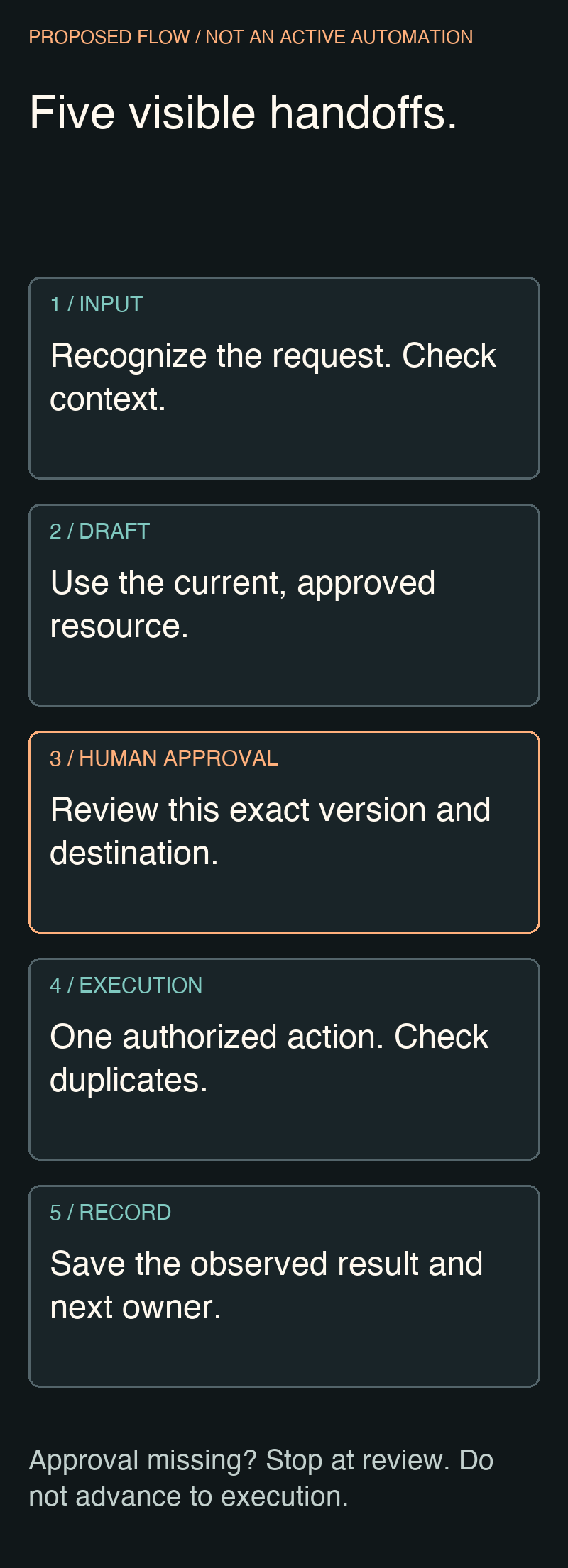
The proposed five-step workflow
1. Input: recognize the request
Record the request's purpose and the channel in which it arrived. Include only the information needed to respond appropriately. Do not collect a full client profile merely because a form or integration allows it.
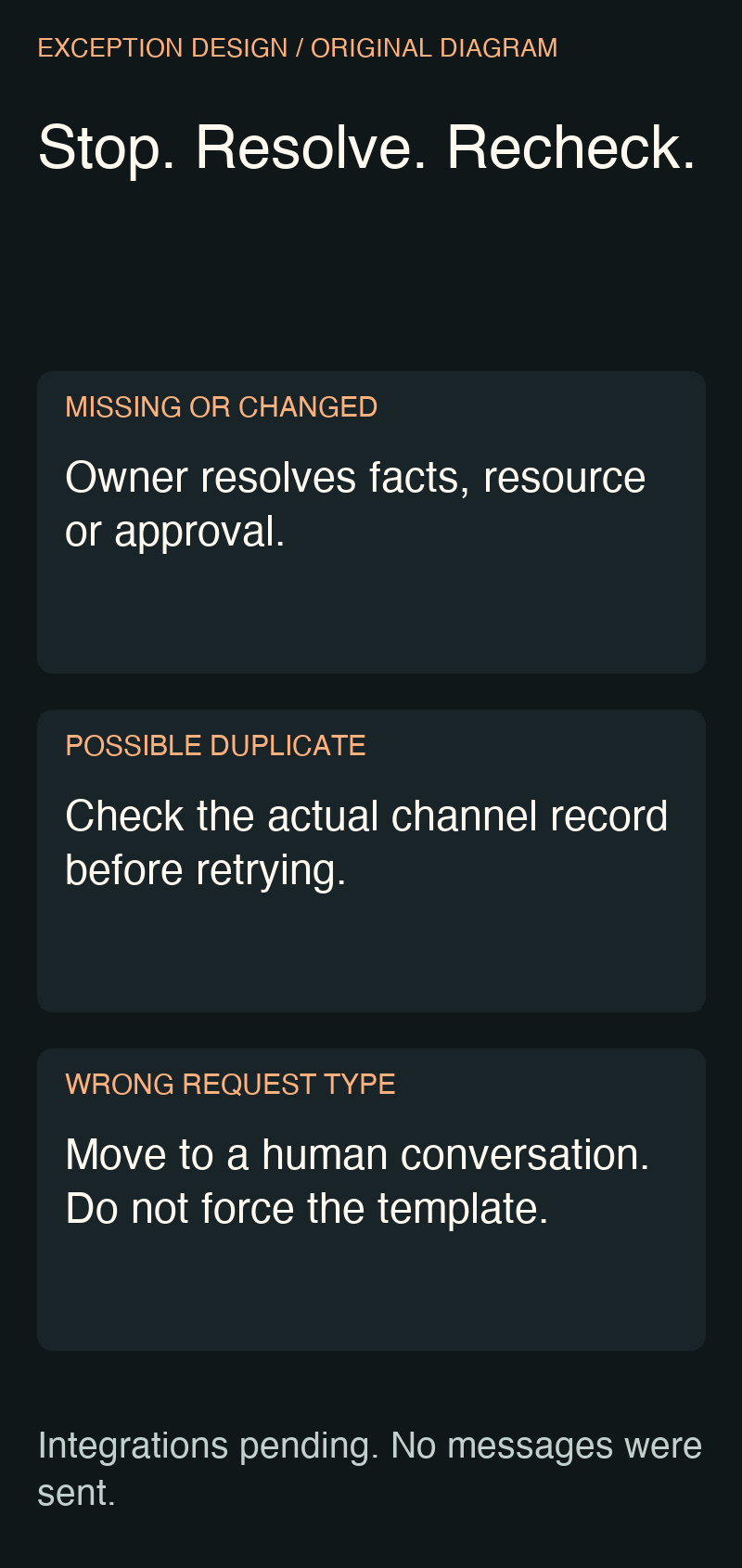
Check whether the request is new, already handled or unclear. If the message asks for a private property assessment instead of the advertised checklist, route it to a human conversation. A similar keyword does not make every request the same task.
2. Draft: use the current approved resource
Prepare a short response that acknowledges the request, explains what the resource contains and includes the verified destination. Keep the resource version visible in the internal record. A broken or obsolete link should stop the process before a message is sent.
The draft should not invent a prior relationship or assume that the requester is ready to list. It can answer the request without adding an aggressive sequence of follow-ups that the person did not ask for.
3. Human approval: review this exact version
The reviewer checks the recipient, context, wording, resource and any commitment the message makes. Approval applies to the specific draft and destination reviewed. If either changes materially, return it for review.
A vague “looks good” in an unrelated conversation is not a dependable approval record. Keep the approved version, reviewer and decision together so the sender can tell exactly what is ready.
4. Execution: one authorized action
The responsible sender uses the approved channel and checks whether the request has already been handled. In the manual starting version, the person sends the message directly. A future integration would need its own permission, configuration and controlled testing.
If the result is uncertain, pause before resending. Check the channel's actual record. A retry after an unclear result can create a duplicate even when the first attempt appeared to fail.
5. Record: distinguish action from outcome
Record the action, time, resource version and observed result. “Sent” is different from “delivered,” “opened,” “replied” or “booked.” Use only the status supported by the available evidence.
The record should also identify unresolved issues and the next responsible person. A tidy log that says “complete” when delivery is unknown makes the workflow less trustworthy, not more efficient.
A filled fictional example
Practice request C-014
Input: a fictional person asks for a seller photo-preparation checklist in the same conversation where the resource was offered.
Draft: “Here is the preparation checklist we discussed. It covers readiness tasks to review before photo day. Start with the items that require another person's help, then note any questions for your listing team.”
Approval: the proposed reviewer confirms the correct recipient, current resource and wording. No actual recipient or live resource link is included in this exercise.
Execution: pending. This is a design example, not a sent message.
Record: fictional request, sample draft, reviewer role identified, integrations not configured.
The sample intentionally stops before a live action. In your own implementation, the approved resource destination must be present and verified before the draft can advance. A placeholder should never pass the approval gate.
Define stops before defining speed
Stop when required information is missing, a resource cannot be verified, the request does not match the routine, approval is absent, or a duplicate may already exist. Assign an owner to resolve the exception. A stop without an owner becomes a silent backlog.
Also define what happens when a person declines further contact or asks a question the routine cannot answer. Route the situation through the appropriate human process. Do not keep sending a standard sequence simply because its schedule was created earlier.
Keep exceptions close to the flow rather than in a separate document no one reads. The useful question is not “Can the software send this?” but “Does this specific request meet the conditions we agreed?”
Ask ChatGPT to draft the process specification
Design a proposed workflow for a real estate professional responding
to a request for an existing, approved seller-preparation checklist.
This is a planning exercise. Do not connect tools or send messages.

Use: input, draft, human approval, execution, record.
For each step specify its owner, required information, output and
condition for advancing. Include a manual first version.

Stop for missing context, an unverified resource, changed approval,
an unclear delivery result, a possible duplicate or a request that
does not match the routine. Assign an exception owner.

Use fictional request C-014. No real client or live resource is supplied.
Label all examples as fictional and all integrations as pending.
Return a process brief, a short draft reply and a test checklist.
Distinguish proposed design, demonstration and verified operation.
Review the output for hidden assumptions. A tool name in a diagram does not establish that the tool supports the proposed trigger or that your account has permission to use it. Record those dependencies instead of presenting them as completed integrations.
What must be verified before a real integration
For each proposed connection, identify the system, exact action, minimum required access, data transferred, owner and available evidence of success. Verify those details against the current product and account before implementation. This article intentionally makes no claim that a particular vendor connection is available.
A controlled test plan should include a normal request, missing information, an outdated resource, withheld approval, a duplicate request and an uncertain delivery result. Use a suitable authorized test environment and recipient. Do not test by quietly sending messages to actual prospects.
Only call the workflow operational after the authorized implementation has passed its defined checks. A diagram is proposed design; a walkthrough is a demonstration; a confirmed end-to-end execution is evidence of a test. Keep those labels accurate.
Two refinements before implementation
Find every point where this workflow could send the wrong resource,
act without current approval or create a duplicate. Suggest a stop
condition and a human owner for each. Do not add new integrations.
This review exposes weaknesses in the handoffs. Fix those before trying to reduce the number of clicks.
Rewrite the workflow so one person can perform it manually.
Keep the same states, checks and completion evidence. Mark which
repetitive steps might later be automated and what must be verified first.
The manual version makes the process usable now. It also reveals whether automation would remove meaningful repetition or merely add maintenance to a task that happens rarely.
Your reusable automation brief
TASK AND CLEAR FINISH:
INPUT AND MINIMUM INFORMATION:
APPROVED RESOURCE / VERSION:
DRAFT OWNER:
REVIEWER AND APPROVAL RECORD:
EXECUTION OWNER AND CHANNEL:
STOP CONDITIONS / EXCEPTION OWNER:
COMPLETION EVIDENCE:
PENDING INTEGRATIONS AND TESTS:
Your next action
Map one recurring request and walk through it manually with fictional information. Resolve unclear ownership and stop conditions before choosing an integration.
Keep the source material ready before repeating the task
Your workflow now has a clear owner and a review step. Before making it repeatable, check the resource it uses. If a listing reply points to a gallery, that gallery should contain the views needed to explain the property; repeating an incomplete presentation only repeats the gap.
For your next Central Florida listing, review Magic Lens services and pricing when planning the photography and visual media that will support the process.