

Magic Lens Photo Media · Vacation Homes
A colorful mural can attract attention, but a guest still needs to understand the room around it. What games are available? Where can other people sit? How does the space connect to the rest of the home? A gallery that only shows decorative close-ups leaves those practical questions open.
When presenting a themed garage or game room in an Orlando vacation home, build the photo sequence around the space guests can actually use. Let the theme create interest, then use room views and details to explain the experience.
Begin with a photograph that explains the room
The first image should establish the relationship between the main activities, seating and circulation space. Look for an angle where the principal game or feature is recognizable without pushing nearby furniture into the extreme edges of the frame. A wider lens is useful only while the room remains believable.
Keep some floor visible so viewers can read how the room is arranged. Avoid giving empty ceiling the same visual weight as the feature you are trying to show. If no single angle explains everything cleanly, use two complementary views rather than forcing every object into one photograph.
The photographed game room in the Windsor Cay portfolio is a useful reference for showing themed decoration together with the room’s contents. It is a visual example of a game room; this image alone does not establish that the space was converted from a garage.
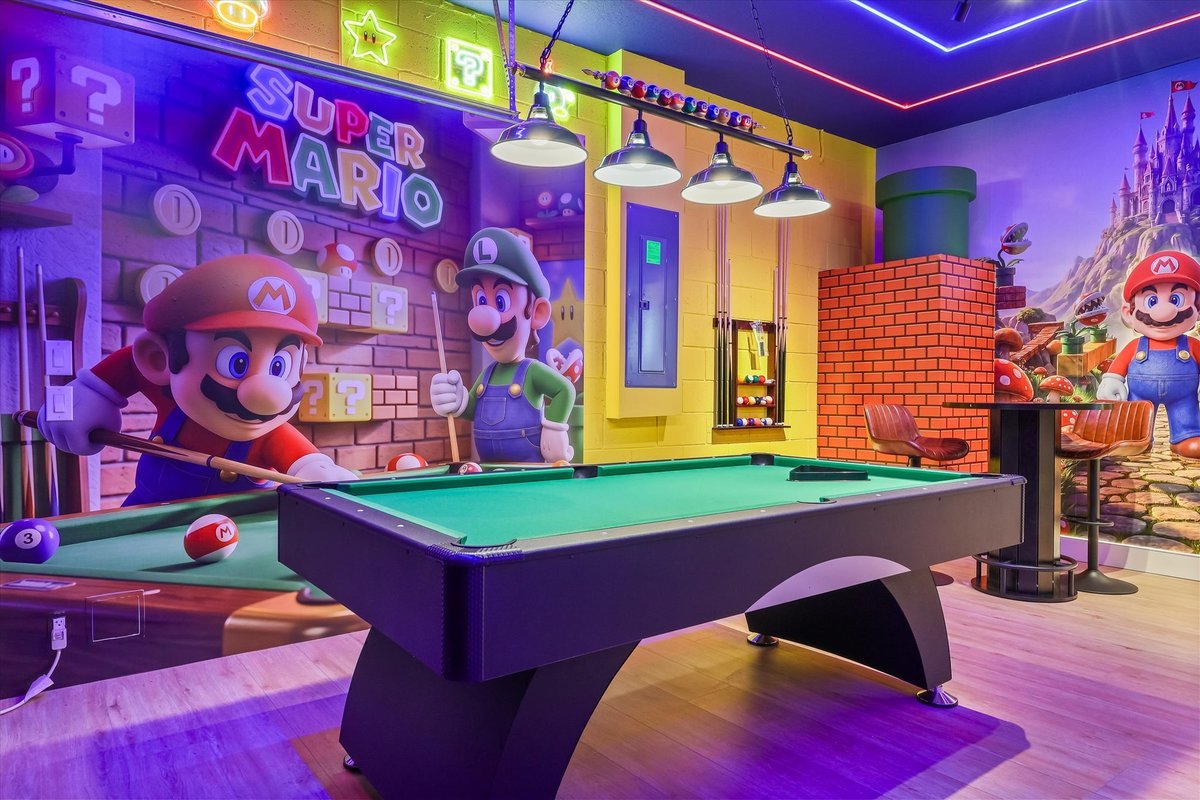
Give each detail a reason to appear
After the room view, select details that answer questions or show something distinctive. A close view of a game table can clarify which game is present. A seating photograph can show how the lounge area is arranged. A mural detail can convey the theme after the viewer already understands the room.
Do not describe visible equipment as operational solely because it appears in a photograph. Before the shoot, the owner or manager should confirm what is available for guests and remove accessories that will not be supplied. The photo gallery and the written amenity list should describe the same stay.
Control the lighting without changing the promise
Colored accent lights can give a themed room its character. They can also make surfaces difficult to read if every image is very dark or strongly tinted. Plan one clear overall view and, when useful, a second image that shows the intended accent-light atmosphere.
Turn on the lights and screens that should appear before the photographer arrives. Check for reflections, flicker and distracting cables. A glowing screen is not a substitute for a readable room. Avoid edits that make a modestly lit space appear to have lighting or equipment that is not actually installed.
A five-image plan for one room
- Room overview: Establish the main activity and the surrounding space.
- Complementary angle: Explain the seating or another activity that the first frame could not show.
- Feature detail: Identify the game or themed element that makes this room distinctive.
- Atmosphere: Show the accent lighting if it contributes to the actual experience.
- Connection: Show the entrance or adjacent area when that relationship needs explanation.
This is a planning example, not a required photo count. A compact room may need fewer images. Two frames that repeat the same information should compete for one place in the gallery.
Prepare the room before photographing it
- Confirm the guest-facing equipment and accessories that will remain in the property.
- Clean reflective surfaces and arrange chairs in their normal usable positions.
- Hide loose packaging and routine housekeeping supplies physically before the shoot.
- Check that lighting and screens are ready for photography.
- Keep entrances and circulation routes visible where they help explain the room.
- Give the photographer any facts that must be described accurately in captions.
A photograph cannot verify insulation, cooling performance, permitted conversion status or safe occupancy. Keep those claims tied to the appropriate property records and confirmed operating information. They should never be inferred from an attractive image.
Connect the feature to the whole stay
A game room is one part of the property. Follow its images with the other spaces a guest needs to assess, using the vacation-home photography checklist. You can also see how the spaces fit into a complete gallery in the Windsor Cay portfolio.
Send the property link, a current room photo and the amenities you want guests to understand. Plan your vacation-home shoot or view vacation-home media options.
Give your next shoot a clear brief.
Send the property link, three priorities and the places where the media will appear.